XPack – ERP for Packaging Industry
Modernizing a legacy ERP system to streamline packaging business operations, transforming outdated workflows into an intuitive platform that serves manufacturers across the entire production lifecycle
Project Overview
XPack is a comprehensive ERP (Enterprise Resource Planning) system specifically designed for the packaging industry. This project involved modernizing a legacy ERP application that had been serving packaging businesses for over a decade. The goal was to transform the outdated interface and workflows into a modern, user-friendly system while maintaining the robust functionality that existing customers relied upon.
The modernized platform addresses the complex needs of packaging manufacturers, covering everything from order management and inventory control to production planning and customer relationship management.
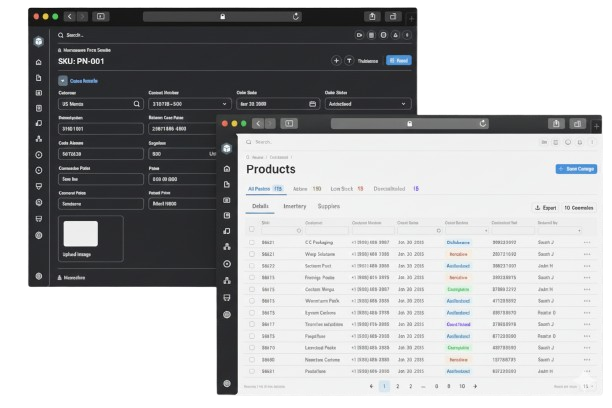
The modernized XPack ERP interface showcasing streamlined workflows and contemporary design
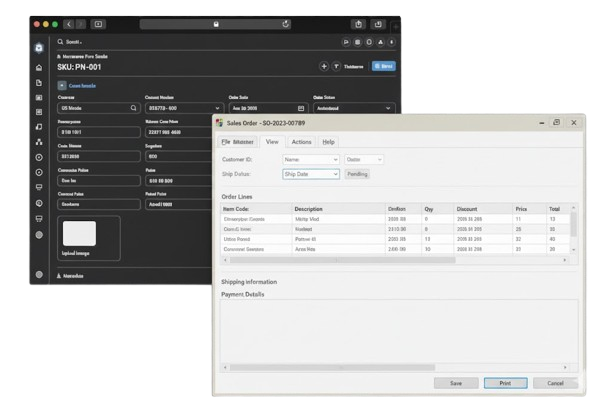
Streamlined sales order entry with smart auto-complete and inline validation
The Challenge
Outdated Interface
Early 2000s design patterns with complex, cluttered screens that confused new users and hindered productivity.
Steep Learning Curve
New employees required extensive training to navigate the system, delaying productivity and increasing onboarding costs.
Inefficient Workflows
Critical functions buried under multiple navigation layers, requiring excessive clicks for common tasks.
Limited Mobility
Poor mobile responsiveness restricted field operations and remote access for sales representatives.
Inconsistent Patterns
Different modules used varying design patterns, creating confusion and reducing efficiency across the platform.
Change Resistance
Existing users were comfortable with the old system, requiring careful balance between innovation and familiarity.
Research & Discovery
Understanding the Users
We conducted extensive user research with existing customers, including interviews with 30+ users across different roles, contextual inquiries, and usability testing of the legacy system:
User Interviews
Conducted 30+ interviews with operations managers, production planners, and sales representatives to understand pain points and workflows.
Contextual Inquiry
Observed users in their natural work environment to identify inefficiencies and opportunities for improvement.
Usability Testing
Tested the legacy system to document specific pain points and measure task completion times as baseline metrics.
Journey Mapping
Mapped end-to-end user journeys for order-to-invoice, production planning, and inventory management workflows.
Key User Personas
- Operations Manager: Manages daily operations, order processing, and inventory. Needs quick access to critical information and streamlined workflows
- Production Planner: Handles production scheduling, resource allocation, and capacity planning. Requires real-time visibility into production status
- Sales Representative: Manages customer relationships and quotations. Needs mobile access and quick quote generation capabilities
Solution Strategy
We modernized the legacy ERP system with a complete UI/UX overhaul while preserving the powerful business logic that customers depended on. The solution focuses on three core pillars:
Modern Interface Design
Clean, contemporary UI with intuitive navigation, consistent design patterns, and responsive layouts for desktop and mobile access.
Streamlined Workflows
Simplified multi-step processes, contextual actions, and role-based dashboards to reduce clicks and improve efficiency.
Gradual Migration
Phased rollout strategy with optional legacy mode toggle, allowing users to adapt at their own pace while maintaining business continuity.
Design Process
Phase 1: Discovery & Research (Weeks 1-3)
- Conducted 30+ user interviews with operations managers, planners, and sales reps
- Performed usability testing on legacy system to establish baseline metrics
- Created user personas and journey maps for key workflows
- Audited existing system to catalog pain points and technical constraints
Phase 2: Design & Prototyping (Weeks 4-10)
- Developed information architecture and navigation structure
- Created low-fidelity wireframes for critical workflows
- Designed role-based dashboards with customizable widgets
- Built high-fidelity prototypes and conducted usability testing
Phase 3: Implementation & Testing (Weeks 11-20)
- Collaborated with development team on component library
- Conducted iterative usability testing with beta users
- Refined designs based on real-world usage patterns
- Created comprehensive design documentation and guidelines
Phase 4: Rollout & Iteration (Weeks 21-24)
- Launched phased rollout with 3 pilot customers
- Provided training materials and onboarding support
- Gathered feedback and implemented quick improvements
- Rolled out to full customer base with legacy mode option
Key Features
Role-Based Dashboards
The modernized system features customizable, role-based dashboards that replace the legacy system's one-size-fits-all homepage:
- Personalized Views: Customizable widgets showing KPIs, pending tasks, and critical alerts relevant to each user's role
- Real-Time Data: Live updates on orders, inventory levels, production status, and delivery schedules
- Quick Actions: One-click access to frequently used functions like creating orders, checking inventory, or generating reports
- Business Intelligence: Visual analytics and trend charts replacing the legacy system's text-heavy reports
Modernized Data Entry & Forms
The legacy system's complex, cluttered forms were completely redesigned with modern patterns:
- Simplified Layouts: Multi-column forms replaced with single-column, mobile-friendly designs with logical grouping
- Smart Auto-Complete: Intelligent suggestions based on historical data and user patterns reduce typing and errors
- Inline Validation: Real-time error checking and helpful guidance replacing cryptic legacy error messages
- Contextual Help: Tooltips and in-app guidance reducing dependency on external documentation
Impact & Results
Lessons Learned
Balance Innovation with Familiarity
Modernizing a legacy system requires careful balance. Too much change alienates existing users, while too little fails to solve core problems. The legacy mode toggle was key to successful adoption.
Involve Users Throughout
Regular user testing and feedback loops were crucial. Involving actual operations managers and planners in design reviews prevented assumptions and ensured real-world viability.
Mobile-First Thinking
Designing for mobile constraints first actually improved the desktop experience. It forced us to prioritize essential features and eliminate clutter.
Phased Rollout Works
The phased approach with pilot customers allowed us to identify and fix issues before full launch, building confidence and ensuring zero customer attrition.
Next Steps
The XPack modernization project successfully transformed a dated but functional ERP system into a contemporary, user-friendly platform. Based on user feedback and market demands, we're planning several enhancements: